


Learn Japanese: HeyJapan
4.62.38K Reviews
App Specs
- Version
- 3.6.1
- Updated On
- License
- Free
- Downloads
- 5,000,000+
- Developer
- Language Skills Studio
- Categories
- Education
- Platform
- Android, iOS
Screenshots

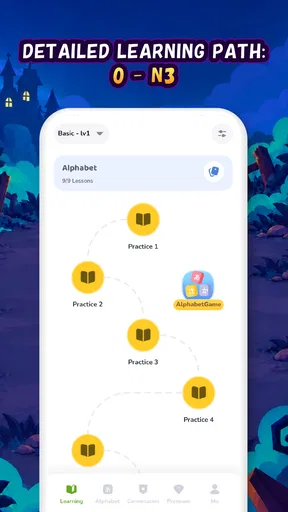
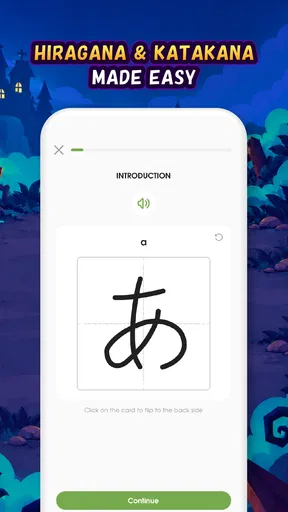
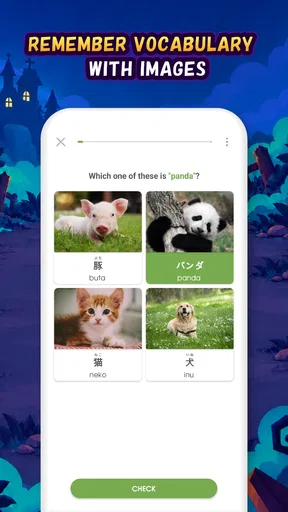
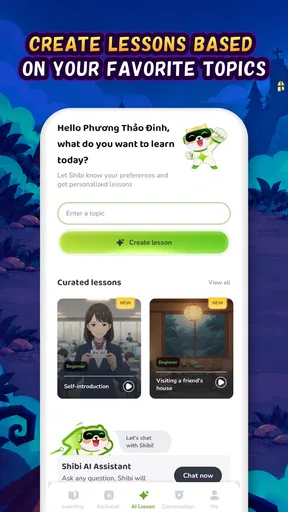
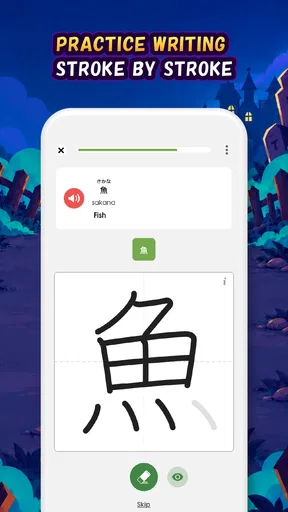
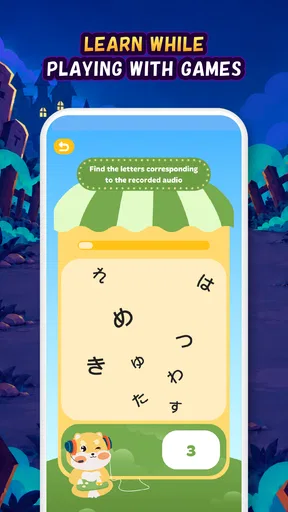
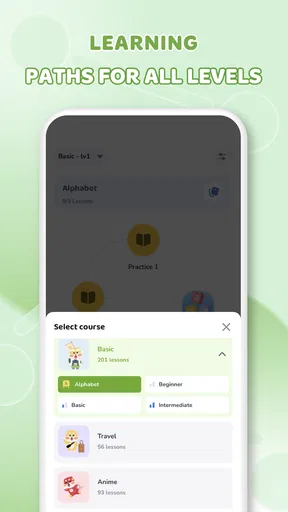
 Analysis by AppCompare
I approached Learn Japanese: HeyJapan as a practical study companion rather than a complete replacement for a teacher, textbook, or conversation partner. Developed by Language Skills Studio, this free education app focuses on the parts of Japanese that usually make beginners hesitate: hiragana, katakana, everyday conversation, and vocabulary. Its appeal is straightforward, but my experience is that the value depends heavily on how you use those areas together.
The app is available to everyone, and its store summary points toward a useful idea: learning Japanese through subjects that already interest you. That makes a difference. Memorizing isolated lists can feel like work, while short lessons connected to familiar situations are easier to revisit. I found the app most convincing when I treated it as a daily practice tool, opening it for a focused session instead of expecting one long course to carry me from complete beginner to comfortable speaker.
How HeyJapan feels in everyday use
I find the best way to judge HeyJapan is to notice what a short session asks of me: choose one learning goal, give it my attention, and leave with something specific to revisit. That makes the app feel approachable, but it also highlights why a phone lesson works best as one part of a steady routine. The next section looks at the practical choices I can make to keep that routine focused.
Quick access matters more than raw speed
For a language app, “fast” is not only about how quickly screens appear. It is also about how little effort is needed to begin studying. HeyJapan suits short sessions because its subject areas are easy to understand: I can decide whether I want to work on a Japanese script, review words, or spend time with conversational material. That clear starting point is more useful than a crowded dashboard filled with unrelated activities.
I would expect the app to feel most responsive on a reasonably modern phone, particularly when moving through short learning activities. The current version is 3.6.0, which suggests that the app has continued to receive maintenance since its launch. Still, I would not judge it like a game with demanding graphics. Its performance needs are mainly tied to lesson loading, audio or media handling where applicable, and the general responsiveness of the study interface.
My preferred routine is a brief review when I have a few spare minutes, followed by a longer session when I can concentrate. This avoids one common mistake: opening a language app with an ambitious plan, becoming tired, and then abandoning it. HeyJapan works better when the goal is modest and repeatable. A small amount of focused practice is more realistic than trying to absorb every available topic in one sitting.
What happens during heavier study sessions
The app becomes more demanding when I move beyond a quick vocabulary check and combine several learning areas in one sitting. Switching between scripts, word practice, and conversation content creates more loading and more mental context changes than staying in one section. That is not necessarily a flaw, but it affects how smoothly a session feels. I recommend finishing one narrow task before jumping to another, especially on an older phone.
Worth Reading Before You Choose

Flipboard Shows What News Apps Must Do Beyond the Feed

Switching to Android Auto Means Rethinking Your Driving Routine

Google Calendar Makes a Crowded Week Easier to Manage

Ludo King Makes the Most of the Minutes Between Plans

Baby Panda World Brings Quick Play to Modern Phones, but Its Game Library Feels Busy

ESPN’s Live Game View Makes Following Close Games Easier
A useful workflow is to begin with recognition, continue with recall, and end with a practical phrase review. For example, I might first revisit a small group of hiragana, then test whether I can remember related words without looking, and finally read a conversational example aloud. This sequence turns separate parts of the app into one study cycle. It also exposes a weakness that a simple lesson completion screen may hide: recognizing a character is easier than producing it quickly in context.
Long sessions can also become less effective even when the app itself remains usable. Japanese scripts require careful visual attention, and vocabulary needs repetition over time. I would rather use HeyJapan in several short visits than leave it open for an exhausting marathon. If your study habit depends on extended explanations, detailed grammar analysis, or a full textbook-style progression, you may eventually need another resource beside it.
Reliability and the value of a repeatable routine
Reliability in a learning app means more than avoiding crashes. It means being able to return to the same kind of practice without feeling lost. HeyJapan benefits from its focused purpose: it is clearly aimed at Japanese learners, not a broad platform where the language course is only one small part of a much larger service. That specialization makes it easier to build a habit around the app.
Language Skills Studio has kept the product available through multiple versions, and the app has attracted a 4.6 average from around 257 thousand ratings. Those figures do not guarantee that every lesson or device experience will suit me, but they do indicate that the app has reached a substantial learner audience. I also see the reported 2.4 thousand reviews as a sign that people have engaged with it beyond a quick installation.
There is a practical reliability question that matters more than popularity: can I remember what I should review next? A good personal system helps. I suggest keeping a tiny note outside the app with characters or words that repeatedly cause mistakes. Then I use the relevant HeyJapan section to revisit them instead of restarting everything. This is especially useful when an app presents plenty of material but does not perfectly match my own weak points.
I would also keep expectations realistic around progress tracking. A completed activity is not the same as long-term recall. If I finish a lesson and cannot reproduce the characters or phrases later, I treat that as a signal to repeat the material, not as a failure of the app. HeyJapan can organize practice, but the learner still has to decide when knowledge has become usable.
Device limits, storage choices, and interruptions
The minimum operating system is Android 7.0, so the app is accessible to many older Android devices. That is helpful for learners who do not want to buy a new phone just to study Japanese. At the same time, minimum compatibility should not be confused with an identical experience on every device. Older hardware may take longer to open lessons, handle media, or recover after switching to another app.
On a phone with limited free space or memory, I would avoid keeping many unrelated apps active during a study session. Closing demanding background apps before practicing can reduce interruptions, particularly when I am moving between several lesson types. This is not a special requirement unique to HeyJapan; it is simply a sensible way to make an older device feel less strained.
Screen size also changes the experience. A larger display makes Japanese characters easier to inspect, while a compact phone is more convenient for quick revision. If I were learning to distinguish similar kana, I would prefer a clear screen and good brightness rather than studying while walking or in a dim environment. The app may be portable, but the best conditions for reading a new script are still calm and visually comfortable.
For people who study during commutes, the main question is how much of their routine depends on uninterrupted access. I would prepare the phone before leaving, keep the battery comfortable, and avoid assuming that every session will be equally convenient in a crowded or noisy place. Japanese pronunciation and character recognition both benefit from attention, so portability is useful, but it should not encourage careless practice.
A realistic daily scenario
Imagine that I am preparing for a trip and have roughly fifteen minutes before work. I open HeyJapan and choose one narrow target rather than attempting a full course. I review a few hiragana, say the sounds aloud, and then move to vocabulary connected with a practical situation. Before closing the app, I revisit the words that felt uncertain. The important part is not the size of the session; it is returning to the same material later instead of assuming one exposure is enough.
After work, I might use a longer session for conversation practice. I read each phrase slowly, identify the words I already know, and mark the unfamiliar ones mentally for another review. If I am tired, I stop after one useful exchange rather than pushing through several lessons without remembering them. This approach makes the app feel less like a checklist and more like a structured prompt for active recall.
For a student, the same method can support classroom work. I can use the app to reinforce a teacher’s explanation of kana or to rehearse vocabulary before a lesson. For a self-learner, it gives a clear place to begin when a textbook feels intimidating. For a traveler, it may help establish a basic foundation, but I would not rely on it alone for every real-world interaction, especially where politeness, listening speed, or unexpected replies matter.
Where it compares well with usual alternatives
Compared with a paper textbook, HeyJapan is more convenient for short, repeated practice. I do not need to carry several pages around, and the app makes it easier to change from script study to vocabulary or conversation. A textbook is usually stronger when I want a carefully explained sequence, extensive grammar notes, and a physical reference I can annotate freely.
Compared with flashcard-only tools, HeyJapan offers a broader starting point because it brings scripts, vocabulary, and conversation into the same learning environment. Flashcards can be better for highly customized repetition, particularly when I want to control every item and review schedule. The trade-off is that building and maintaining a personal flashcard system takes more effort than opening a prepared app.
Compared with a live tutor, the app is obviously more flexible and less intimidating for private practice. I can repeat a character or phrase without feeling embarrassed. A tutor is better at correcting pronunciation, explaining why a sentence sounds unnatural, and adapting immediately to my mistakes. I see HeyJapan as a useful first layer, not a substitute for human feedback when speaking accuracy becomes important.
Compared with a broad language platform, its Japanese-specific focus is an advantage for someone who wants to start with kana and practical language rather than browse multiple languages. The limitation is equally clear: learners seeking a wider academic curriculum, advanced grammar, or a complete path toward fluent conversation may need to combine it with other resources.
What the free model means for a learner
HeyJapan is free to install and use as an entry point, which lowers the barrier for anyone curious about Japanese. There are in-app purchases ranging from about eleven dollars to about sixty dollars per item. I would therefore spend time testing the free experience before paying. The right question is not whether extra access exists, but whether the available material fits my study goal and whether I will genuinely return to it.
This pricing structure makes the app easier to recommend to beginners who are still deciding how seriously they want to study. It is less straightforward for someone comparing several paid courses and expecting a single purchase to provide every explanation, correction, and advanced resource. I would treat any purchase as an investment in a particular learning workflow, not as a guarantee of fluency.
The age rating is Everyone, which makes the app suitable for a broad audience. Parents or teachers choosing it for younger learners should still consider the child’s reading level and ability to study independently. The content may be accessible, but learning Japanese requires patience, and a younger student may benefit from an adult helping turn short app activities into a consistent routine.
Who should use it, and who should look elsewhere
I recommend HeyJapan to beginners who want a friendly place to start with hiragana, katakana, basic vocabulary, and conversational material. It is also a good fit for learners who already know some Japanese but need a convenient way to refresh foundational knowledge. The app’s strongest role is as a repeatable practice companion that makes it easier to return to Japanese between classes or larger study sessions.
I would be more cautious about recommending it as the only resource for an advanced learner. If your main priorities are detailed grammar progression, nuanced writing correction, specialized vocabulary, or sustained conversation with feedback, a textbook, tutor, or dedicated advanced course will probably serve you better. Similarly, people who dislike learning from a phone may get more from a physical book and handwritten exercises.
One non-obvious advantage is that script practice can reveal whether my vocabulary study is built on recognition alone. I may think I know a word because I recognize its shape, but switching attention to the individual kana exposes gaps quickly. I use that friction productively: whenever a word feels slow, I return to its characters instead of simply memorizing the translation again.
Another useful trade-off is the balance between prepared material and personal control. HeyJapan reduces the setup time because I can begin practicing without designing a full curriculum. However, I have less control than I would with a carefully built personal deck. Learners with very specific goals should use the app selectively and keep their own list of priority words rather than following every topic with equal attention.
A third insight is that conversation content becomes more valuable when I read it aloud and then revisit the same phrase later in a different mood or setting. Silent recognition can create false confidence. I use the app to prompt speaking, but I judge progress by whether I can retrieve a phrase without staring at the screen. That small change turns passive browsing into a more demanding and useful exercise.
My performance verdict
After weighing speed expectations, heavier study moments, reliability, and older-device compatibility, I see HeyJapan as a lightweight and approachable Japanese-learning app rather than an all-in-one language school. Its focused coverage makes it easy to begin, and its free entry point removes much of the risk for a curious beginner. The reported 5M+ installs also show that it has become a widely used option, though popularity alone should not replace personal testing.
The developer, Language Skills Studio, has positioned the app around practical foundations that are easy to revisit. I like that emphasis because Japanese can feel overwhelming when learners try to tackle scripts, grammar, vocabulary, and conversation simultaneously. The app gives me a manageable starting structure, while still leaving room for a more complete study system around it.
My main reservation is not about basic usefulness but about depth and personal adaptation. I would not expect short app sessions to provide the correction, explanation, and flexibility of a teacher. I would also avoid paying for expanded access until I knew that the lesson style matched my habits. On older phones, I would keep sessions focused and minimize background activity to protect responsiveness.
My recommendation is simple: use HeyJapan as the daily doorway into Japanese, not as the entire house. If you want a convenient way to practice kana, build vocabulary, and become familiar with everyday conversation, it is worth trying. If your goal is advanced fluency, formal writing, or confident spontaneous speaking, pair it with resources that provide deeper explanations and real feedback. With that expectation, the app feels practical, accessible, and most effective when used consistently rather than intensely.
The current version is 3.6.0, and Android users need version 7.0 or later. Since the app is free to start and rated for Everyone, I would begin with a short, repeatable routine: one script target, a small vocabulary review, and one spoken phrase. That is enough to discover whether its pace and organization suit me before I commit more time or consider an in-app purchase.
Pros
- Short lessons are easy to fit into a busy daily routine.
- Covers practical vocabulary useful for travel and everyday conversations.
- Audio examples help learners practice pronunciation and listening skills.
- Progress tracking makes it easier to maintain a consistent study habit.
- Suitable for beginners who need a gentle introduction to Japanese.
Cons
- Some useful lessons or features may require a paid subscription.
- Grammar explanations can feel too brief for learners seeking deeper detail.
- Practice activities may become repetitive after extended use.
- Limited speaking feedback may not replace interaction with a native speaker.
- An internet connection may be needed for some content and functions.
FAQs for Learn Japanese: HeyJapan
What is Learn Japanese: HeyJapan, and who is it designed for?
Learn Japanese: HeyJapan is a mobile language-learning app designed to help users study Japanese through structured lessons, vocabulary practice, listening activities, and interactive exercises. It can be useful for complete beginners as well as learners who want to review basic grammar, phrases, and everyday expressions. The app is especially suitable for people who prefer short, guided study sessions on Android or iOS.
What Japanese skills can I practice with HeyJapan?
HeyJapan generally focuses on the core skills needed for everyday Japanese communication. Depending on the lesson path, you may practice vocabulary, sentence patterns, pronunciation, listening comprehension, and common conversational phrases. Beginners can also use it to become familiar with hiragana and katakana. It is best viewed as a structured learning aid rather than a complete replacement for speaking with native Japanese users or studying advanced grammar.
Is Learn Japanese: HeyJapan free to download and use?
The application can typically be downloaded at no initial cost, but some lessons, learning features, or additional content may require in-app purchases or a subscription. The exact free and premium limits can vary by platform, region, and current version. Before starting a trial or subscription, check the payment details, renewal terms, and cancellation instructions shown in the Google Play Store or Apple App Store.
Does HeyJapan require an internet connection?
An internet connection may be needed for downloading the app, synchronizing progress, loading certain lessons, and accessing subscription-related features. Some previously downloaded material may remain available offline, but offline access should not be assumed for every exercise or audio component. If you plan to study while traveling, open the required lessons in advance and verify which content continues to work without mobile data or Wi-Fi.
Is HeyJapan enough to become fluent in Japanese?
HeyJapan can provide a convenient foundation, particularly for vocabulary, basic phrases, listening practice, and maintaining a daily study routine. However, no single app is usually enough to achieve full fluency. Japanese learners will benefit from combining HeyJapan with regular speaking practice, reading authentic material, writing exercises, grammar references, and exposure to native audio. Your results will depend heavily on consistency and the amount of practice you complete.


